
1. FEDEX

LINK: https://www.fedex.com/pt-pt/shipping/international-prohibited-items.html
Simply click on the drop-down menu and select the destination country for the shipment:

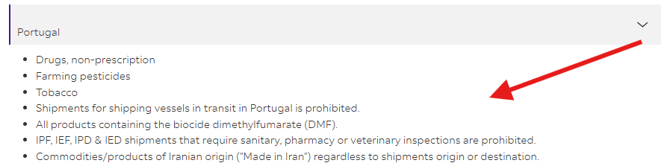
Afterwards, it will display the list of items restricted for shipment to that selected country, as shown in the example:
2. DHL
GENERAL LIST:
In the center of the screen, you will see DHL's standard shipping restrictions in general, which are permanently prohibited in all countries:

You can select the boxes to view general and standard item restrictions by DHL.
RESTRICTIONS BY COUNTRY:
You can view the list of restrictions by country by selecting the drop-down menu on the right side of the page:
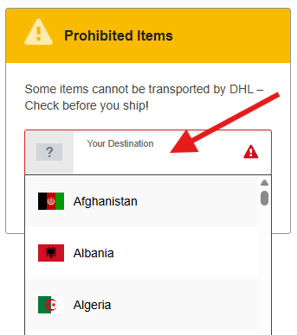
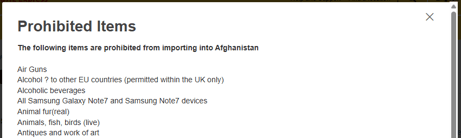
When you select the desired country, the list will open in a pop-up in the center of the screen, as shown in the example:
3. UPS
LINK: https://www.ups.com/ga/CountryRegs?loc=pt_BR
Simply select the country of origin of the shipment (where it will depart from) from the drop-down menu “Origin Country or Territory” - and select the destination (where it will go) from the drop-down menu next to it “Destination Country or Territory”:
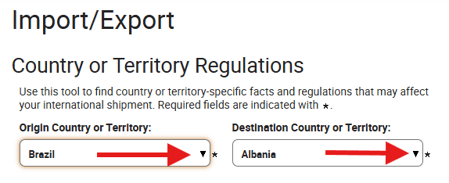
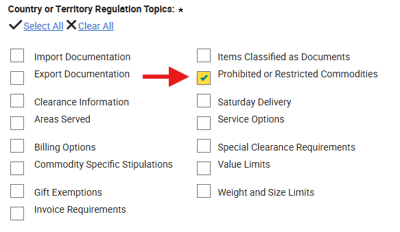
Afterwards, there will be a selection list below these drop-down menus that will display a list of topics you can choose to view information about, ranging from Required Documents to the list of Prohibited Items for shipping to that country.
Simply select the option "Prohibited or Restricted Commodities":
Below, after selecting the topic you want, click on the button:

The information selected in the drop-down menu of topics will then be displayed. If you select more than one, you will be able to see all the data, including items prohibited for shipment.
It will be possible to confirm the origin and destination and the chosen topic:
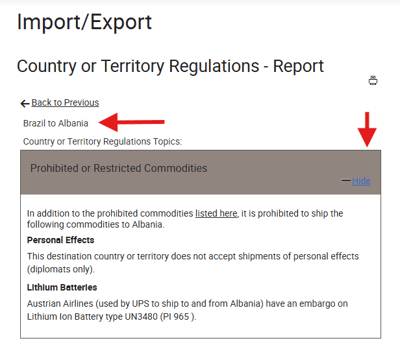
For a new query, simply click on the button below the list of topics “<---- Back to Previous” and make a new query or select more items for viewing.