
Correctly registering the HS Code of products is important to ensure that international freight quotes are correctly made.
What is the HS Code?
The HS Code corresponds to the first 6 digits of the NCM (Nomenclature of the Common Mercosur), which is used by the government to distinguish the profile of products and their respective taxations.
Example:
- NCM: 06011000
- HS Code: 060110
Step-by-Step to Register the HS Code
1. Access the Nuvem Shop Panel
Log in to your Nuvem Shop store, navigate to the product section, and locate the product you want to edit.
2. Access the Product Variation Options
When viewing the product, click "More options" next to each registered variation.
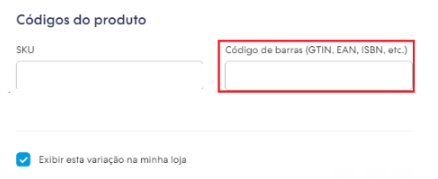
4. Enter the HS Code in the "Barcode" Field
In the Barcode field, enter the first 6 digits of the NCM, which correspond to the product's HS Code.
5. Save the Changes
After entering the HS Code, click Save to ensure the changes are applied.
Important:
If the "Barcode" field is not filled in with the HS Code, ShipSmart's system will not be able to provide international freight quotes for this product, and a message that delivery is not available for the location will be displayed on the screen.
How to Find the HS Code of Your Products
If you don't know which HS Code should be used for your products, you can check the corresponding NCM code with your company's tax officer or consult your country’s government website.